How to Turn an Anime Image Into an AI Prompt
Have you ever found an anime image you love but couldn't describe it well enough to recreate something similar?
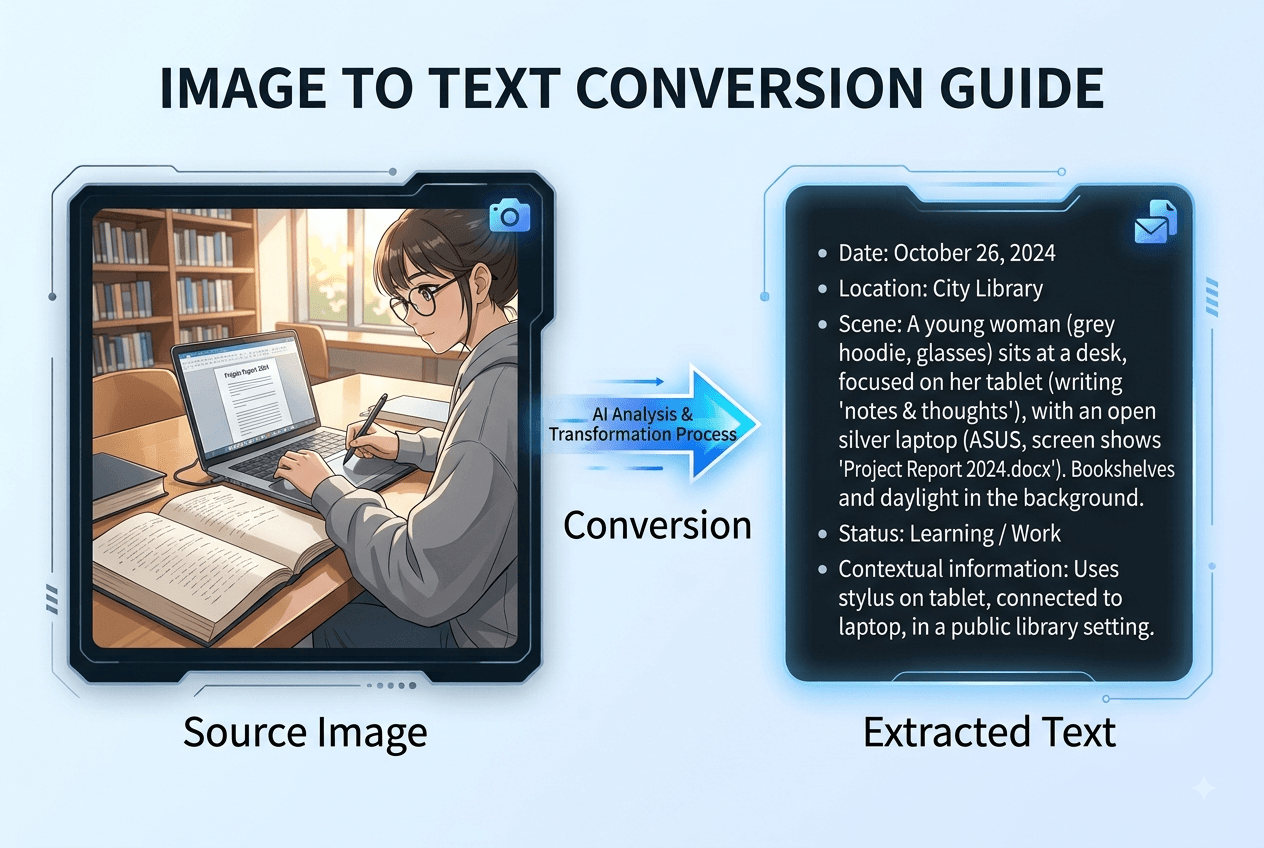
An anime image to prompt tool can help. Instead of manually identifying the character, hairstyle, clothing, pose, background, and lighting, you can upload a reference image and let AI turn its visual details into a usable prompt.
In this guide, you'll learn how to convert an anime image into an AI prompt, refine the result, and use it with image-generation tools such as Nano Banana.
What Is an Anime Image to Prompt Generator?
An anime image to prompt generator analyzes an image and converts its visual information into text that can be used as a starting point for AI image generation.
A simple image caption might say:
An anime woman holding flowers.
But that doesn't tell an image generator much about the original image.
A more useful description could identify:
- Character appearance
- Hair and eye color
- Clothing and accessories
- Pose and expression
- Objects
- Background
- Lighting
- Composition
For example:
A young anime woman with fair skin, dark navy-black hair, large violet eyes, and a deep purple sleeveless dress, holding a bouquet of white flowers against a dark background.
The goal isn't simply to describe what is visible. A useful anime image to text workflow captures the visual details that matter when you want to create a similar image or develop a new variation.
How Does an Anime Image to Prompt Tool Work?
So, how does AI turn a picture into a prompt?
The process can be simplified into four steps.
1. Identify the Main Subject
AI first determines what the image is primarily about.
For an anime illustration, this could be:
young woman, anime character, portrait
2. Analyze Visual Details
The system then identifies characteristics such as:
dark hair, violet eyes, purple dress, gemstone earrings
3. Understand the Scene
The AI can also analyze relationships between the character and objects:
standing, one hand near her hair, holding white flowers
It may also recognize the background, composition, and lighting:
nearly black background, strong contrast, bright highlights
4. Generate a Description or Prompt
These observations are combined into natural language that can be edited and used as an image to AI prompt.
This is much faster than starting with a blank prompt and trying to remember every visible detail yourself.
What Details Should an Anime Prompt Include?
Not every detail in an image is equally important.
When converting an anime picture to prompt, focus on the elements that define the visual result.
Character
Start with the main subject:
young woman, fair skin, dark navy-black hair, large violet eyes
Clothing
Describe distinctive clothing and accessories:
deep purple sleeveless dress, flowing skirt, gemstone earrings, necklace
Pose and Expression
The character's action can have a major effect on the generated image:
standing, one hand near her hair, holding flowers
Objects
Include objects that are visually important:
bouquet of white lily-like flowers with green stems
Background
The background establishes the environment:
nearly black background, minimal surroundings
Lighting and Composition
Finally, describe the visual presentation:
dramatic lighting, strong contrast, bright highlights, centered composition
A good anime prompt generator should therefore capture several layers of information rather than produce only a short caption.
How to Turn an Anime Image Into a Prompt
You can turn a reference image into an AI-ready prompt in a few simple steps.
Step 1: Choose Your Reference Image
Start with an anime illustration, character artwork, manga-style image, or another reference image you want to understand or use as inspiration.
Step 2: Upload the Image
Open the AI Image Checker Image Describer and upload your image.
The tool analyzes the visible content and generates a detailed description.
Step 3: Review the Description
Check whether the generated result correctly captures the details you care about.
Pay particular attention to:
- Character
- Hair and eyes
- Clothing
- Pose
- Objects
- Background
- Lighting
If something is inaccurate, edit it before using the result as a generation prompt.
Step 4: Refine the Prompt
You don't always need to use the generated description exactly as it is.
You can remove unnecessary details, emphasize important features, or change elements such as the background, clothing, or lighting.
For another way to analyze visual content before creating a prompt, you can also use the AI Image Analyzer.
Real Example: From an Anime Image to an AI Prompt
Let's look at a practical example.
Imagine an anime illustration showing a woman in a purple dress holding white flowers against a dark background.
Step 1: Analyze the Reference Image
After uploading the image, the AI-generated summary might be:
An anime-style woman in a dark purple dress holds a bouquet of white flowers while posing against a dark background.
The detailed analysis can provide much more information:
A stylized anime illustration of a young woman with fair skin, dark navy-black hair, and large violet eyes. She wears a deep purple sleeveless dress with a flowing skirt, along with delicate gemstone earrings and a necklace. Her right hand is raised near her hair, while her left hand holds a small bouquet of white lily-like flowers with green stems. Bright highlights illuminate her face, shoulders, and flowers against a nearly black background.
Step 2: Extract the Important Elements
copying the entire description
Character
young woman, fair skin, dark navy-black hair, large violet eyes
Clothing
deep purple sleeveless dress, flowing skirt
Accessories
gemstone earrings, necklace
Pose
one hand near her hair, holding flowers
Object
bouquet of white lily-like flowers
Background
nearly black background
Lighting
dramatic high-contrast lighting, bright highlights
Step 3: Build the AI Prompt
These details can then be combined into a generation prompt:
Anime-style young woman with fair skin, dark navy-black hair and large violet eyes, wearing a deep purple sleeveless dress with a flowing skirt, delicate gemstone earrings and necklace, holding a bouquet of white lily-like flowers, one hand raised near her hair, nearly black background, dramatic high-contrast lighting, bright highlights on her face and flowers, detailed anime illustration.
This is the key advantage of an anime image prompt generator: you start with the image rather than a blank page. use this prompt to your image generator, then you can get a similar photo.
How to Use the Prompt With Nano Banana
Once you have a detailed description, you can use it as the starting point for an image-generation workflow.
The process looks like this:
Reference Image → AI Image Checker → Image Description → AI Prompt → Nano Banana → New Image
When preparing your prompt, focus on the details that define the reference:
- Character
- Appearance
- Clothing
- Pose
- Objects
- Background
- Composition
- Lighting
You can also modify individual elements.
For example, keep the character and pose but change:
nearly black background
to:
sunset garden background
Or replace:
deep purple dress
with:
elegant white dress.
This allows you to use an existing anime image as inspiration while creating your own variations.
Keep in mind that AI image-generation results depend on the model, prompt, reference image, settings, and randomness. A detailed prompt can provide a stronger starting point, but it does not guarantee an identical recreation.
What Is a Danbooru Pony Prompt?
Anime image generation communities often use Danbooru-style tags and Pony prompts.
Instead of describing an image with complete sentences, a tag-based prompt might look like:
1girl, solo, long hair, violet eyes, purple dress, holding flowers, dark background, dramatic lighting
These tags describe characteristics such as:
- Character count
- Hair
- Eyes
- Clothing
- Pose
- Objects
- Environment
This is why someone searching for a danbooru pony image to text prompt generator may want to convert an existing anime image into structured tags.
A Danbooru prompt generator or Pony prompt generator can provide a useful starting point instead of requiring users to identify every tag manually.
However, different models can interpret tags differently. A prompt that works well in one anime workflow may not produce the same result in another. Review and adjust generated tags before using them.
If you prefer natural-language prompting, a detailed image description may be easier to edit. If you use a tag-based anime workflow, structured tags may be more convenient.
Can an Anime Image to Prompt Tool Recreate the Original Image?
It can help create a visually similar result, but it shouldn't be treated as a guarantee of an identical recreation.
The final result depends on factors such as:
- Original image
- Prompt quality
- Image-generation model
- Reference-image capabilities
- Generation settings
- Randomness
A practical workflow is:
Generate → Review → Edit → Generate Again
If the character is accurate but the background is wrong, modify the background prompt. If the pose isn't close enough, make the pose more explicit.
The goal is to create a useful visual starting point rather than promise a pixel-perfect copy.
Frequently Asked Questions
Turn Your Anime Image Into an AI Prompt
Upload your image to the AI Image Checker Image Describer, let AI analyze the character, clothing, pose, objects, background, lighting, and composition, then refine the result into a prompt for your preferred image-generation workflow.